Write your way.
Choose a rich text editor, Markdown or HTML for your pages and articles.
Give your content a good home. Bring pages, articles and the tools to shape them together in one self-hosted platform.
Self-hosted · Perpetual single-organisation licenseA comfortable foundation for the work you want to do.
Choose a rich text editor, Markdown or HTML for your pages and articles.
Manage translated content and language preferences across domains.
Adjust theme settings or work directly with the built-in code editor.
Build forms and review submissions inside your admin.
Use configurable routes, sitemaps and crawler settings to organise visibility.
Build integrations with the REST API and use the included API documentation.
Find your rhythm with three ways to write. Explore the editor previews, then try a little theme customisation.
Open the theme playgroundStart with a blank page. Add your point of view. Make something that feels like you.
A little room for imagination# Ideas deserve a place to grow.
Start with a **blank page**.
Add your point of view.
- Write something meaningful
- Give it room to breathe
- Share it with the world<article class="story">
<h1>Ideas deserve a place to grow.</h1>
<p>Make something that feels
like you.</p>
</article>Illustrative editor previews · explore the live theme demo
| Architecture | Linux, ARM64 or AMD64 |
|---|---|
| Installation | Docker or Podman containers |
| Minimum resources | 1 CPU · 512 MB RAM · 3 GB storage |
| Databases | SQLite, PostgreSQL or CockroachDB |
| File storage | Local / shared filesystem or S3-compatible storage |
| Templates | Liquid, HTML, CSS and JavaScript |
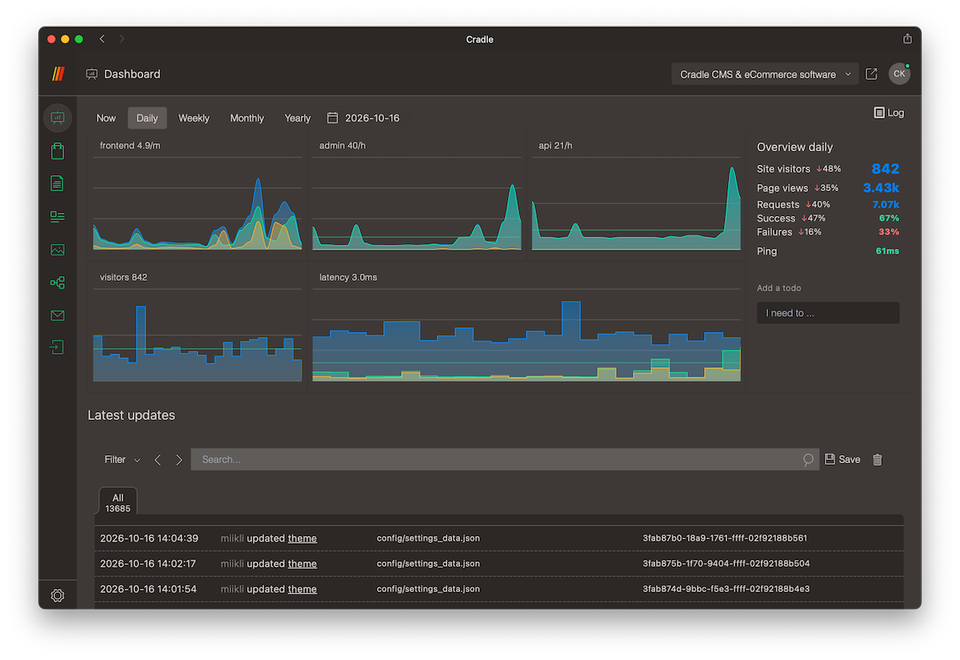
Product screenshot from cradlecms.com. The live product interface differs from this redesign.
Yes. The license is perpetual for a single organisation. The first 12 months include support and updates; continued use does not require renewing updates.
The licenses cover unlimited sites, domains and administrative users for the licensed organisation. See the original license agreement for the full conditions.
Cradle is self-hosted. Choose a compatible Linux server on your own infrastructure or with a cloud provider. You manage the deployment and its maintenance.
The original site lists a 14-day refund policy. Read its current terms and contact Cradle directly for purchase or refund questions.
Start with the documentation or email support@cradlecms.com. The team typically responds within 24 hours on working days for configuration, errors and integrations.
Take a closer look at the license that suits your plans.